How Independent Living Facilities Know Their Residents Are Well Every Day
Four approaches, what each one actually tells you, and which combination most communities land on.
ResidentCheckin is an automated daily wellness-check service for independent living communities. Residents confirm they’re okay each day, and staff are alerted the moment someone doesn’t respond. Trusted since 2012. It is the active daily check-in option below — and unlike the consumer apps families buy, it is built for the operator: a real-time staff dashboard, per-staff alerting, and a timestamped record of every resident, every day.
Independent living is defined by the thing that makes this hard: residents live in their own units, come and go as they please, and did not move in to be supervised. Knocking on every door is the traditional answer — a 100-unit community typically spends 2–3 staff hours a day on wellness rounds, or 20+ hours a week. Below are the four approaches operators use instead, in the order most communities encounter them.
Active daily check-ins
An active daily check-in asks each resident, once a day, to confirm they are okay. With ResidentCheckin that happens by automated phone call (answer and press 1), by text (reply OK — 70+ natural variations are recognised), by Alexa, or by the resident calling in early. It works on any phone — landline, flip phone, or smartphone — in English, Spanish, French, Cantonese, or Mandarin, set per resident. There is no app, no WiFi requirement, and nothing to install to get started.
The reason operators start here is that it is the only approach that returns a positive confirmation. A resident who presses 1 has been heard from. Everything else on this page infers wellbeing from the absence of a bad signal, which is a weaker claim and a harder one to staff.
What it tells you
That a specific resident was well at a specific time, with a timestamp you can show a family member or a regulator.
What it costs you
A small daily ask of the resident. Most regular users complete a check-in in about three seconds.
Built for operators, not for families
This is the distinction that matters most when you are evaluating options. Consumer daily-call services — including iamfine, our own sister product under the same parent company, Hambros — notify a family “Care Circle” when someone misses a check-in. That is the right design for one person living at home, and the wrong one for a community, where your staff are the responders.
ResidentCheckin is the operator version: alerts route to the staff on shift by email and SMS, admins set their own notification preferences, and everything lands on one dashboard for the whole building. Same proven check-in engine, running since 2012 — a different product around it.
Passive / ambient sensors
Passive systems infer wellbeing from ordinary activity: motion, door, and presence sensors in the unit report that someone is up and moving. Nothing is asked of the resident, which is their real advantage — a passive check-in never interrupts anyone.
The trade-off is what silence means. A quiet sensor could be a fall, a flat battery, a resident who left early for an appointment, or a sensor that simply did not see them. Sensor-only systems resolve that by alerting staff to go and look, which is why alert fatigue is the most common complaint operators raise about them. The other cost is the deployment itself: sensors in every unit and a hub, installed before you know whether staff will trust the alerts.
ResidentCheckin treats passive sensing as a layer on the active check-in rather than a replacement for it. Our optional Passive Check-In reads the Zigbee motion sensors a community already owns — including existing K4Connect hardware — so an ordinary morning closes the check-in quietly, with no call. When there is no sign of activity, the system calls the resident automatically and only involves a person after a genuine non-response. Motion and presence only: no cameras, no microphones, opt-in per resident, and we neither sell nor mark up hardware.
Side-by-side detail: in-room sensors alone vs. sensors plus an active check-in.
Emergency response
Pull cords, wall buttons, and wearable pendants are the category most communities already have. They exist for a different job: a resident in trouble who can summon help right now. They are reactive by design and depend on the resident being conscious, reachable, and wearing the device.
Daily wellness checks and emergency response are complements, not substitutes. A pendant answers “something is wrong, come now.” A daily check-in answers “is everyone accounted for this morning?” — which is the question that catches the resident who fell overnight and could not reach anything.
Important: ResidentCheckin is not an emergency service
Residents should always call 911 in an emergency. ResidentCheckin is an added safety layer that surfaces missed check-ins and messages needing human follow-up. Communities must not rely on it for emergency notification, and it does not replace your existing emergency call system.
Staff dashboard & alerting
Whichever way the signal arrives, someone on shift has to see it and act. This is the layer where operator tools separate themselves from consumer ones, and it is usually where a check-in pilot succeeds or quietly dies.
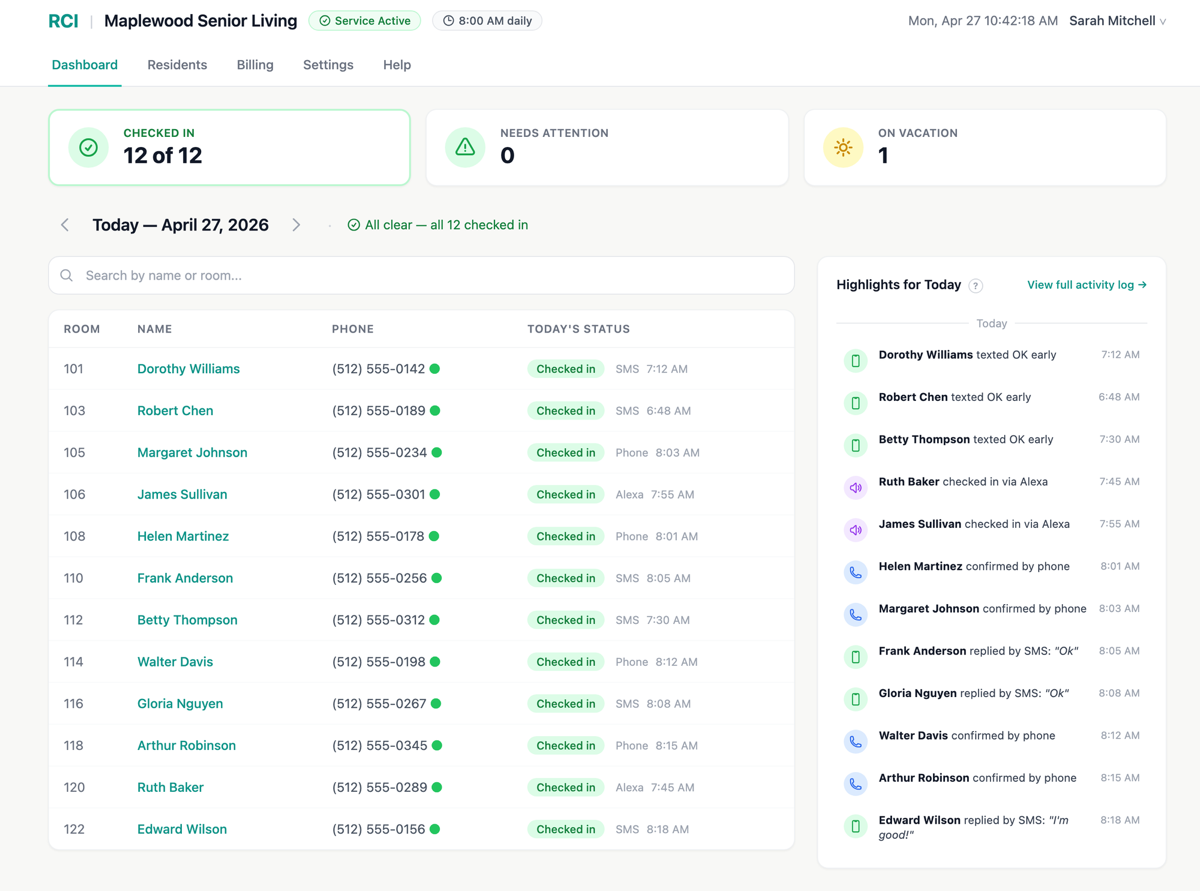
On ResidentCheckin, staff work from a real-time dashboard showing every resident’s status for the day. A resident who doesn’t answer is retried every 10 minutes for up to an hour, and by SMS as well as by call, before anyone is paged — so staff get one consolidated alert about a genuine non-response, not a stream of maybes. Replies that are not a simple “OK” are triaged into two tiers: urgent phrases such as “I need help” alert staff immediately by email and SMS, while ambiguous ones get a one-hour review window and a single follow-up. Every flagged item has a one-click Mark handled that writes to the history.
Admins choose their own notification preferences and daily summary. The full timestamped history exports for compliance, which is the part operators tend to underrate until the first time a family asks when their mother was last seen.
What most communities end up with
In practice: keep the emergency call system you already have, make an active daily check-in the backbone because it is the only one that confirms rather than infers, and add passive sensors where they reduce interruptions rather than replace the check-in. The staff dashboard is not optional in any of these — it is what turns a signal into a response.
ResidentCheckin covers the active check-in, the optional passive layer, and the operator dashboard in one service. Published pricing starts at $500/mo for up to 40 residents, and the 14-day trial runs on up to 5 residents with no credit card and nothing installed.
See how it compares
We keep two neutral comparison pages alongside this guide — one covering the whole category, one for operators currently evaluating K4Connect.
No credit card. Up to 5 residents. First check-ins go out the next morning.